The DOM…
- is an API for web documents, representing an HTML or XML document as a tree-like structure of nodes.
- provides a way to programmatically interact with and manipulate the elements and styles of a web page.
- is a cross-platform and language-independent API, standardized by the W3C and originally published by the W3C in 1998. It arose out of the need for a standardized way to interact with the document structure, which was browser-specific before then.
- can be accessed by the global
documentobject when JavaScript runs in a browser.
<html>
	<head>
		<title>My title</title>
	</head>
	<body>
		<a href="https://google.com">My link</a>
		<h1>My header</h1>
	</body>
</html>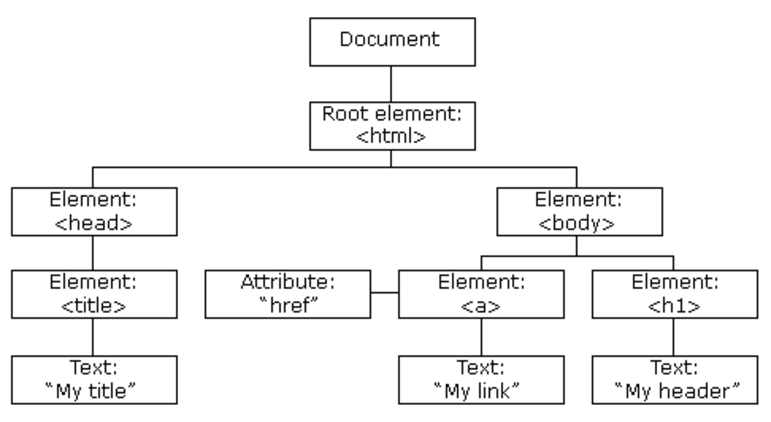
Why should you care about the DOM?
- Dynamic and rich web pages: With the DOM, you can modify a web page on the fly, without requiring a page reload.
- Event handling: Attach event listeners to elements on the page. You can respond to user interactions, such as clicks.
- Web app development: Libraries and frameworks, such as React, Angular, or Vue.js, heavily rely on the DOM.
- Browser compatibility: By leveraging the DOM, you can write JavaScript that works across browsers and platforms.
However, even amongst experienced developers, there is often a knowledge gap when it comes to the DOM. You don’t need to understand the inner workings of the DOM if you’re using a library like jQuery.
Is the DOM composed of “nodes” or “elements”?
The DOM is a tree of Node objects. There are different types of nodes. Elements are a type of node, derived from Element, which inherits from the Node interface.
| Constant | Value | Description |
|---|---|---|
Node.ELEMENT_NODE | 1 | HTML elements like <p>, <body>, or <script> |
Node.TEXT_NODE | 3 | The Text inside an Element or Attr. |
Node.COMMENT_NODE | 8 | A comment, such as <!-- --> |
Node.DOCUMENT_NODE | 9 | The entire window.document object. |
The DOM API
The global object document represents the root of the HTML document and provides methods and properties to interact with the DOM.
Retrieving elements
// get the first element matching the specified id
const element = document.getElementById('elementId');
// get live collection of all elements with specified class name
const elements = document.getElementsByClassName('className');
// get elements with specified tag name
const elements = document.getElementsByTagName('tagName');
// get first element that matches specified CSS selector
const element = document.querySelector('selector');
// get a NodeList of elementings matching CSS selector
const elements = document.querySelectorAll('selector');
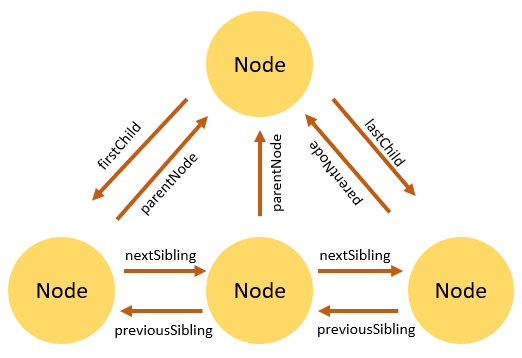
Traversing the DOM
Any node has relationships to other nodes in the DOM tree.
Modifying elements
document.createElement(htmlTag): Creates a new element with the specified tag name.appendChild(node): Appends a node as the last child of an element.removeChild(node): Removes a child node from an element.replaceChild(newNode, oldNode): Replaces a child node with a new node.insertBefore(newNode, referenceNode): Inserts a new node before a reference node.cloneNode(deep): Clones an element, optionally including its descendants ifdeepis set totrue.
Modifying element properties
element.textContent: Gets or sets the text content of an element.element.innerHTML: Gets or sets the HTML content of an element.element.setAttribute(name, value): Sets the value of an attribute on an element.element.getAttribute(name): Retrieves the value of an attribute from an element.element.removeAttribute(name): Removes an attribute from an element.element.style.property: Accesses or modifies the inline style of an element.element.classList: Provides methods to manipulate the class list of an element, such asadd(),remove(),toggle(), andcontains().
innerHTMLvs.textContent
innerHTMLshould be used sparingly to avoid potential security risks. Prefer to usetextContentfor adding text.
innerHTML vs. createElement() for manipulating the DOM
Favor createElement(). It has better performance, security, flexibility, & maintainability.
Use innerHTML when you need to set or replace the entire content of an element with an HTML string. Be sure to securely sanitize any user input strings.