- JavaScript attaches event listeners to DOM elements and defines the event handlers that specify what should happen when events occur.
- When an event occurs on an element (e.g. a button click), the DOM generates an event object and propagates it through the DOM tree.
Event propagation
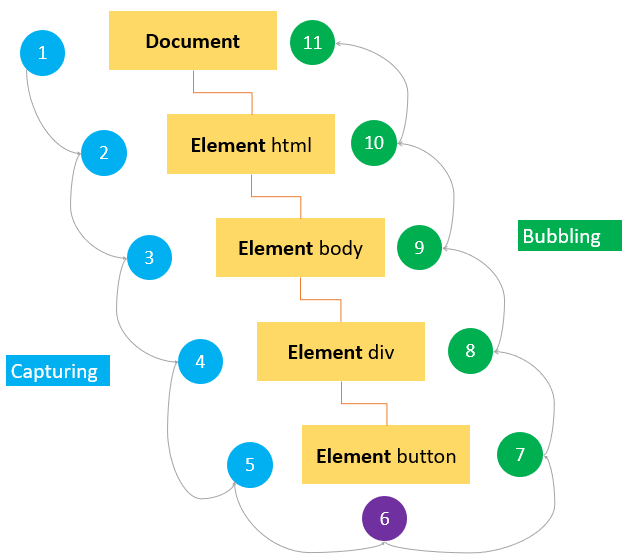
The order in which events are received on the page and propagated through the DOM tree.
There are three event phases:
- Event capturing phase
- Starting from the root of the DOM tree (usually
document) and travels down the tree. - Event listeners are only triggered when the third parameter of
addEventListener(),useCapture, is set to true.
- Starting from the root of the DOM tree (usually
- Target phase
- Event listeners are triggered and the target receives the
Eventobject.
- Event listeners are triggered and the target receives the
- Event bubbling phase
- Traveling back up the tree, allowing a final response to the event.
- Event bubbling is more commonly used than event capturing.
- Bubbling allows for event delegation, where event listeners are attached to parent elements to handle events triggered by their children. This optimized performance and simplifies code.
Event control and Delegation
event.stopPropagation()is commonly used when you want to prevent an event from bubbling up the DOM tree and being handled by ancestors.event.preventDefault()prevents the default behavior of an event, such as navigating to a clicked URL.- Event delegation is a widely used technique where an event is handled by a parent element instead of by individual children. It improves performance and simplifies code.
Event handling
Event handling refers to the responding to user actions, such as button clicks, submitting a form, or pressing a key, and system events in a web page.
- Event listeners are the preferred method to add event handling:
element.addEventListener(event, handler) - Event handlers are less flexible and outdated. Handlers are assigned to an element’s event property:
element.onclick = ...- Only one event handler, per an event type, can be assigned to an element!
- You can also assign event handlers via the HTML event handler attribute but that should be avoided. (Separation of concerns and timing issues.)
let btn = document.querySelector('#btn');

// Event listeners are the preferred method of event handling.
function eventListener1(event) {
	console.log('First event listener fired');
}
btn.addEventListener('click', eventListener1);

// Multiple listeners can be added to the same element.
// Event listeners / handlers will fire in the order added.
btn.addEventListener('click', function(event) {
	console.log('Second event listener fired');
});

// There's also event handlers. Though they're less flexible and outdated.
// Only one event handler, per event type, can be added to an element.
btn.onclick = function() {
	console.log('Event handler fired');
};

// Event listeners / handlers fire in the order added.
// If a click event were to occur here. The console would log:
// "First event listener fired"
// "Second event listener fired"
// "Event handler fired"

// You can only remove event listeners with a reference to the specific function.
btn.removeEventListener('click', eventListener1);
// Remove the event handler. (Or replace by assigning another.)
btn.onclick = null;
Common events
clickwhen an element is clicked.submitwhen a form is submitted.loadwhen a page or an asset (image, script, etc.) has loaded.DOMContentLoadedwhen the initial HTML document has been completely loaded and parsed, without waiting for external resources.changewhen the value of an input, select, or textarea element has changed.- And more…
keydown,keyup,keypress,mouseover,mouseenter,mouseleave,scroll,resize, etc…
Programmatically dispatch events
- Using JavaScript, you can simulate events and trigger the associated event handlers.
- Programmatic dispatch and custom events provide a powerful way to simulate user interactions, trigger actions, and facilitate communication within your application.
- Events dispatched programmatically go through the standard event propagation phases (capturing, target, and bubbling).
To generate an event programmatically:
- Create a new
Eventusing the constructor. - Trigger the event using
element.dispatchEvent().
let btn = document.querySelector('.btn');
// Create an Event. Specify the event type and optional options object.
let event = new Event('click', { bubbles: false, cancelable: false });
// Fire the event on a target element and trigger any event listeners.
btn.dispatchEvent(event);
Custom events
- Custom events allow you to define your own event types and include additional data with the event.
- Custom events allow you to decouple the code you want to execute after another piece of code completes. For example, you can separate the event listeners in a separate script. Additionally, you can have multiple event listeners to the same custom event.
// Create a custom event using the CustomEvent constructor
const customEvent = new CustomEvent('myCustomEvent', {
	detail: {
		message: 'This is a custom event',
		data: { /* Additional data */ }
	}
});

// Get the element on which you want to dispatch the custom event
const element = document.getElementById('myElement');

// Dispatch the custom event on the element.
// The event will simulate the full event propagation cycle.
element.dispatchEvent(customEvent);