In a web app, anyone can send a request. Without some mechanism to confirm identity, the server cannot distinguish between a friend, a stranger, or malicious actor.
Thus, there are two mechanisms to resolve this id and access issue:
- Authentication: Who are you? Identity.
- Authorization: What do you have access to? Permissions.
There are four main authentication choices:
| Sessions | JSON Web Tokens | OAuth (3rd-party) | Ad-Hoc / Other | |
|---|---|---|---|---|
| Statefulness | Stateful (server memory) | Stateless (token holds identity) | Typically stateless (external provider) | Varies; typically stateless |
| Complexity | ✅ Very simple | ⚠️ Moderate setup (token signing) | ❗️ Complex setup (3rd party integration) | ⚠️ Usually custom; complexity varies |
| Scalability | ❗️ Limited to single-server (or needs shared state) | ✅ Easily scales horizontally | ✅ Scales well with provider | ⚠️ Varies, often not scalable or standard |
| Security considerations | Easy logout, risk of session fixation | Token expiration required; token leakage risk | Relies on external provider security | Usually bespoke risks; custom management |
| Best suited for | Small apps, single-server, rapid MVPs | APIs, multi-client apps, scalable projects | Consumer-facing apps, frictionless UX | Specialized scenarios, IoT, magic-link auth |
Historical Timeline
1991–1995: Stateless Origins + Cookies Introduced
- HTTP, by design, is stateless — servers treat each request as a completely new interaction.
- In the mid-1990s, HTTP cookies were introduced to help servers “remember” clients.
- This enabled the session-based authentication model, where the server creates a session in memory and gives the client a cookie containing a session ID.
2010–2012: Rise of Single Page Apps and Mobile Clients
- The rise of SPAs, mobile apps, and IoT devices made session-based auth more cumbersome.
- These clients consume APIs, not full HTML pages, and often don’t handle cookies reliably.
- The need for a stateless, portable auth solution grew.
2010–2014: JSON Web Tokens Standardized and Adopted
- JSON Web Tokens (JWTs) were standardized around 2010.
- Unlike sessions, JWTs store identity information client-side in a digitally signed token.
- This enabled stateless auth: any server with the signing key can validate the token — perfect for horizontally scaling apps.
2012–2016: OAuth Becomes the Dominant Delegated Auth Standard
- OAuth 2.0 became the standard for third-party login (“Sign in with Google/Facebook”).
- Instead of storing passwords, users authenticate with a trusted provider.
- Ideal for consumer apps, it also became popular in enterprise Single Sign-On (SSO) setups using services like Okta and Auth0.
🧪 2015–present: Ad-Hoc + Passwordless Methods Gain Niche Popularity
- Developers begin exploring magic links, one-time tokens, API key auth, and device certificates in IoT, Developer APIs, and Lightweight prototypes.
- While innovative, these approaches are often custom, lack standardization, and introduce potential security complexity.
Authentication Types Overview
All authentication methods aim to answer the same two questions: 1) Who are you? 2) What are you allowed to do?
Each differs primarily in…
- How identity is stored
- Where it is verified
- and how scalable or user-friendly they are
Sessions (The Classic Method)
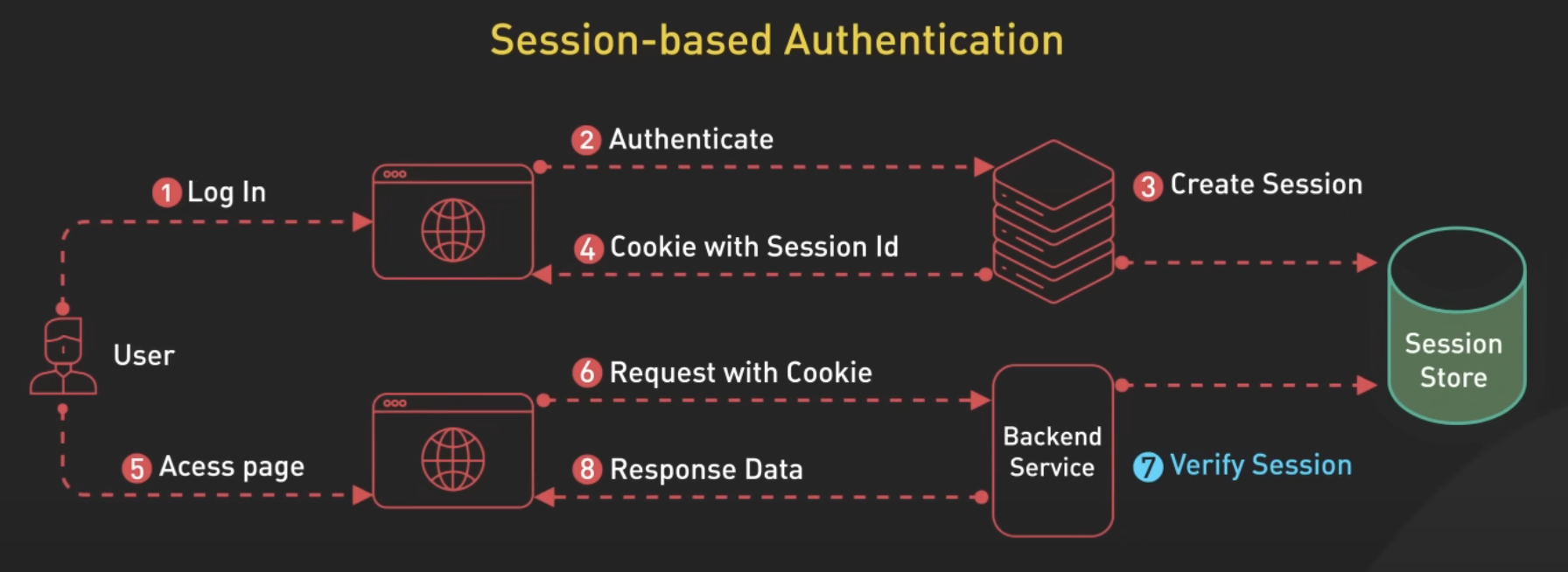
Sessions, the classic method, are stateful—storing identity on the server. When a user logs in, the server creates a session (a record in memory or a database) and sends the client a cookie containing a session ID. The client includes this ID on each request. The server looks it up to retrieve the user’s identity and permissions.
JSON Web Tokens (JWTs)
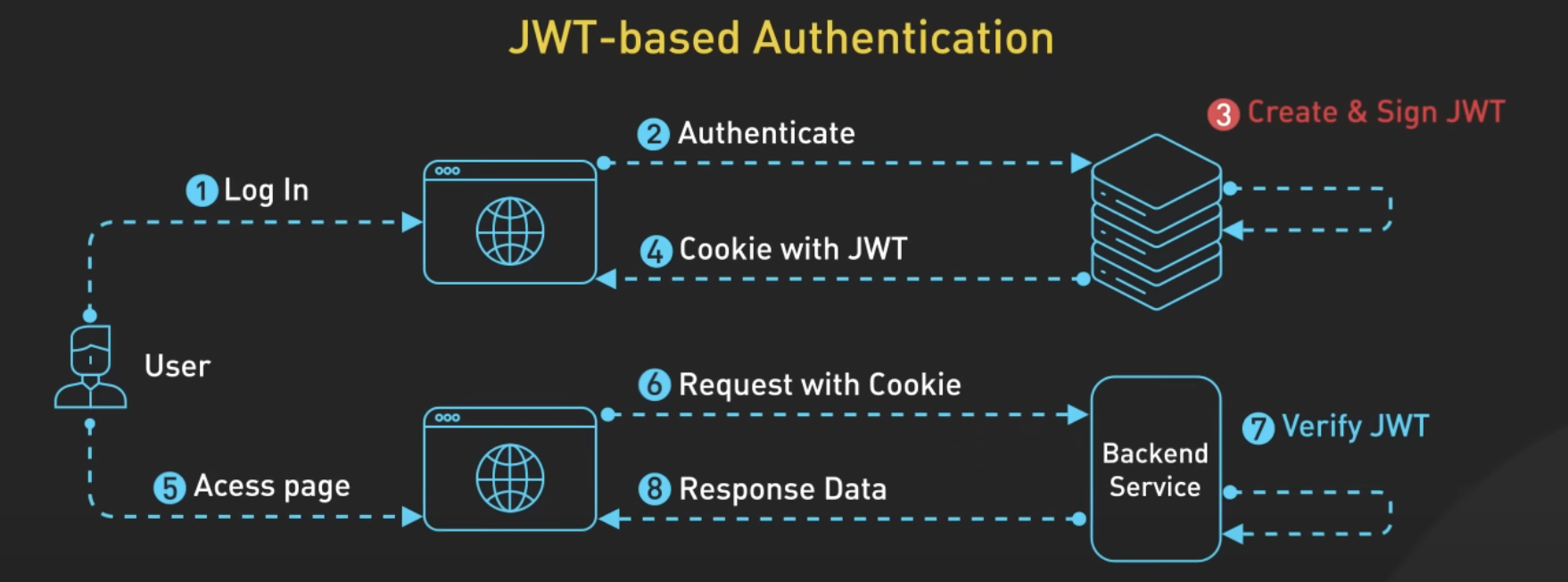
A modern, stateless alternative. After the user logs in, the server issues a digitally signed token (JWT) containing all relevant user info. The client stores and sends this token with every request. Any server with the signing key can validate the token without a session store. These features make it scalable and workable across many clients.
OAuth (3rd-Party or Federated Identity)
Instead of managing identity yourself, you let a trusted provider (like Google, Apple, or an enterprise IdP) authenticate the user. Your app receives an access token proving the user’s identity. You can use this token to create your own session or issue a JWT.
Ad-Hoc / Other
Custom methods like magic links, API keys, or device certificates. Useful in narrow cases like developer tools, one-click login flows, or IoT.
Summary
In some sense, sessions, JWT, and OAuth seem similar at first glance: the server authenticates the user, gives the client some information, and the client uses that information for subsequent requests.
Tip
The crucial difference is where identity information is stored and verified:
Sessions are stateful, storing identity information server-side in memory or a database. Sessions are like hotel keycards, the keycard doesn’t identify you, it’s meaningless without the hotel’s system that maps keycards to guests and rooms.
JWTs are stateless, storing identity information client-side within the token itself. JWTs are like event tickets. The ticket contains all identifying info: name, seat assignment, event date, etc.
OAuth delegates authentication entirely to a trusted third-party provider (like Google or Apple). Your app then receives a token confirming that authentication. OAuth is like showing up to an event with a VIP wristband issued by someone else. The venue trusts your wristband correctly IDs you.
Full API Auth Pipeline
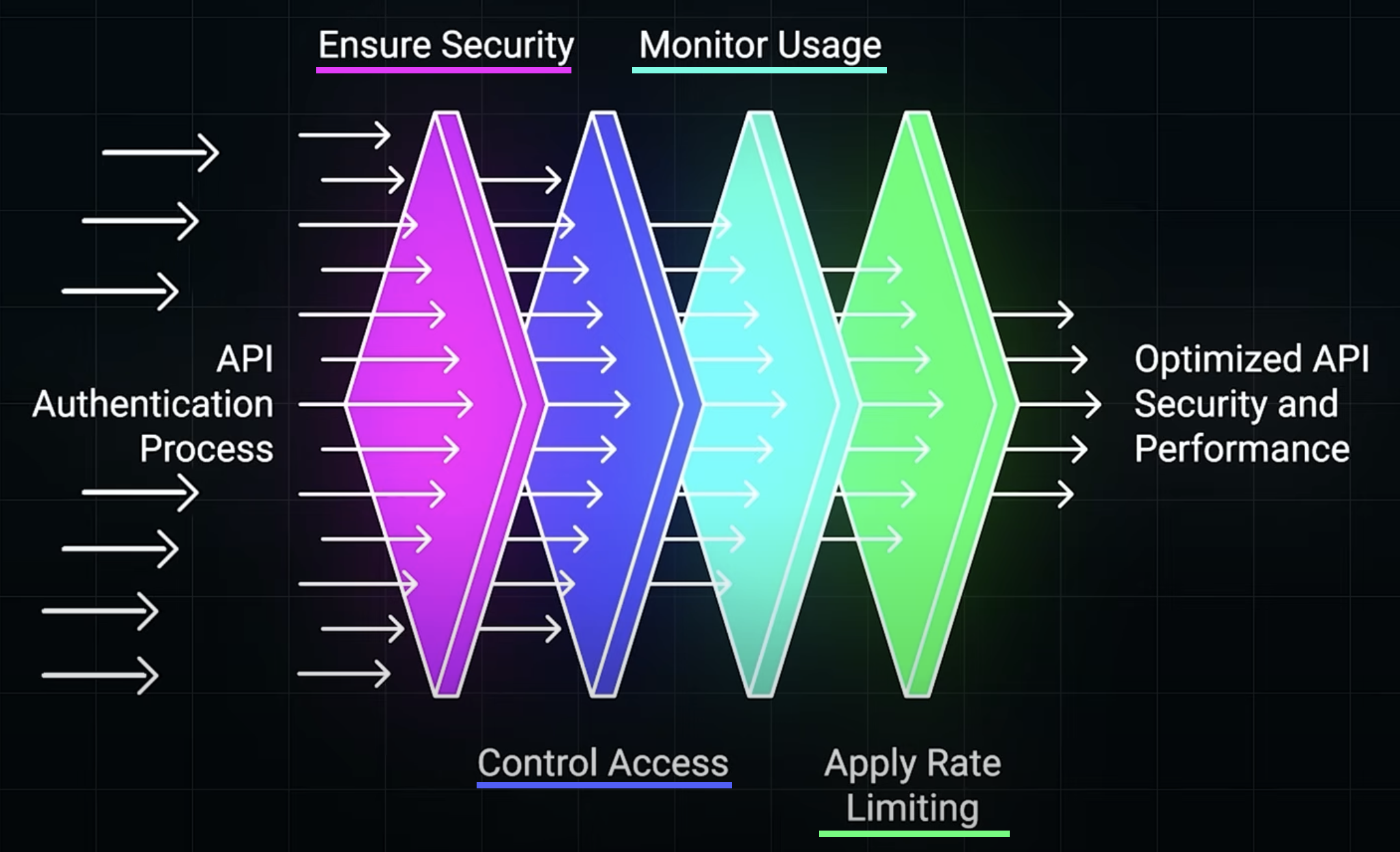
The below diagram illustrates the multi-stage pipeline of API authentication and access control as a progression of layered defenses and optimizations that every request must pass through.
- Ensure Security: verify authentication of credentials before a user can proceed.
- Control Access: apply authorization roles based on roles or user-specific permissions. For example, a basic user might be blocked from an admin-only endpoint.
- Monitor Usage: adds observability and traceability which is useful for auditing and detecting API abuse.
- Apply Rate Limiting: enforces limits on how frequently a client can make requests, protecting against spam and attacks.
Security Best Practices
Regardless of authentication choice, these practices are critical:
- HTTPS everywhere to prevent credential interception.
- Securely store passwords (bcrypt hashing, never plaintext).
- Mitigate cookie risks by using cookie flags (
HttpOnly,Secure,SameSite). - Token expiration and revocation strategies for JWTs and OAuth tokens.
- Rate limiting and request monitoring to prevent brute force attacks and abuse.
Web Essentials
HTTP headers
- HTTP headers are basically metadata included with HTTP requests and responses.
- An HTTP header consists of its names followed by a colon (
:), then its value. - Examples of HTTP headers:
User-Agent: The type of device and browser making a request.Content-Type: Signifies if the body content is text, HTML, JSON, etc.Strict-Transport-Security(HSTS): Enforces HTTPS connections to the sever.Cache-Control: Directs the caching mechanisms in browsers and CDNs.Set-Cookie: Used by the server to send a cookie to the client.
Cookies
- Cookies play a pivotal role in web authentication, primarily session management, enabling servers to store and retrieve state on the client’s browser.
- Cookies are crucial for maintaining session state across stateless HTTP transactions.
- When a client makes a request to a server, the server responds with a
Set-Cookieheader. The browser stores and sends theCookieheader with every request made to the same domain. - Cookies can store user IDs or other identifiers, enabling the server to identify the client.
- Cookies can introduce privacy and security risks.
- Implement HTTPS throughout your app to ensure cookies are encrypted during transit.
- Use the
HttpOnly,Secure, andSameSiteattributes to mitigate risks.
Auth Libraries
Passport.js (Node.js)
- Passport.js is middleware for Node.js that uses different “strategies” to flexibly perform different types of authentication.
- It offers a wide range of strategies: OAuth, local (username & password), etc.
- On each HTTP request, Passport will use a strategy to determine whether the requestor has permission to access that resource. If the user does not have permission, a 401 Unauthorized is returned.